mc
Vector-06C disk images in Midnight Commander

Two extfs plugins that turn disk images of the Soviet-era Vector-06C home computer into ordinary directories: press Enter on an image in mc and walk into it, copy files in and out, delete them — no mounting, no emulator, no separate tool.
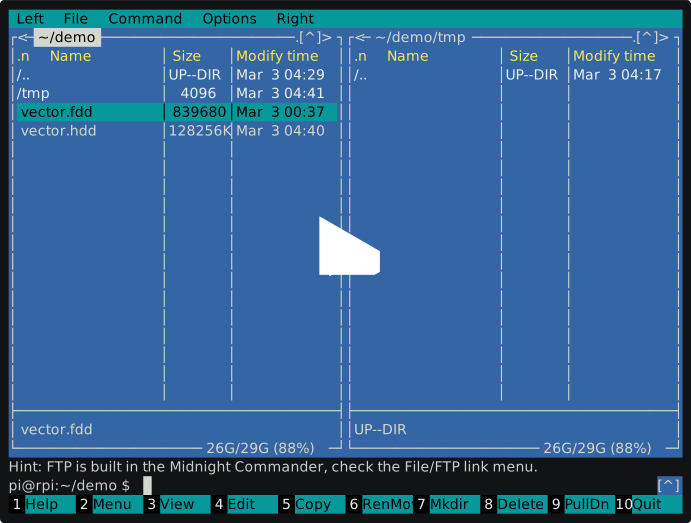
| plugin | handles | what you get |
|---|---|---|
ufdd |
floppy images, *.fdd |
the files of the CP/M filesystem inside; listing, copying both ways, deleting |
uhdd |
hard disk images, *.hdd |
the floppies the image is made of, as disk_0001.fdd … ; copying out and replacing |
CP/M user numbers show up as directories user_1 … user_15, user 0 being the root of
the image. A slash inside a CP/M name is shown as ∕ (U+2215), since a real slash would
be a directory separator to mc.
Install on macOS
brew tap ekundo/mc-fdd
brew install ekundo/mc-fdd/mc-fdd
mc-fdd install
Homebrew is only allowed to write inside its own prefix, so the last step is a separate
command: it links the plugins into the mc user data directory and registers *.fdd and
*.hdd in the mc user extension file. mc-fdd uninstall undoes it, mc-fdd status
shows what is installed where. The tap lives in
ekundo/homebrew-mc-fdd.
Install on Debian, Ubuntu, Raspberry Pi OS
type -p curl >/dev/null || sudo apt install curl -y
curl -s --compressed "https://ekundo.github.io/mc/ppa/KEY.gpg" | gpg --dearmor | sudo tee /etc/apt/trusted.gpg.d/ekundo_ppa.gpg >/dev/null \
&& sudo curl -s --compressed -o /etc/apt/sources.list.d/ekundo_ppa_list_file.list "https://ekundo.github.io/mc/ppa/list_file.list" \
&& sudo apt update \
&& sudo apt install mc-fdd mc-hdd -y
The packages put the plugins into /usr/lib/mc/extfs.d and add the entries to the mc
extension file of the system, keeping the original around through dpkg-divert, so
nothing of mc is overwritten. sudo apt remove mc-fdd mc-hdd puts everything back.
Install by hand
mkdir -p ~/.local/share/mc/extfs.d
cp packages/mc-fdd/ufdd packages/mc-hdd/uhdd ~/.local/share/mc/extfs.d
Then add the entries below to ~/.config/mc/mc.ext.ini, right after Version=. mc reads
that file instead of the system one, not in addition to it, so start from a copy of the
system mc.ext.ini — mc -F prints where both live. Note the doubled backslash: mc since
4.8.30 reads this file as an ini and a single one is silently ignored.
[fdd]
Regex=\\.fdd$
RegexIgnoreCase=true
Open=%cd %p/ufdd://

[hdd]
Regex=\\.hdd$
RegexIgnoreCase=true
Open=%cd %p/uhdd://
On mc older than 4.8.30 the same goes into ~/.config/mc/mc.ext in the old syntax:
regex/\.([fF][dD][dD])$
  Open=%cd %p/ufdd://
Requirements
ufdd needs cpmtools and gawk. The v06 disk
format is not one cpmtools knows, so the plugin carries the definition itself and does
not care what is in the system diskdefs. uhdd needs nothing beyond bash and
coreutils.
How the images are laid out
A floppy image is 839680 bytes: 164 tracks of 5 sectors of 1024 bytes, the first 8 tracks being the system area, the rest a CP/M filesystem with 2048 byte blocks and 128 directory entries.
A hard disk image is a stack of floppies: a 16 bit little endian count of them sits at
offset 132, the 8 reserved tracks lie on the container once, in sectors 2..81, and from
sector 82 on the floppies follow one after another, 1570 sectors each, every one of them
beginning with its own CP/M directory. Reading a disk out of a container therefore means
gluing a reserved area and the 1560 sectors from that directory back into a plain .fdd
image, which is what uhdd hands over to mc.
Only the first floppy owns the reserved area of the container: the 80 sectors before the
directory of any other one are the tail of the floppy before it, so the rest get an area
of E5h, the way formatting leaves it. And the container holds 392 blocks per floppy
where an image of 164 tracks has room for 390 — floppies that reached the last two do
exist, and such a floppy comes out as an image of 166 tracks instead, 849920 bytes, the
size T72.fdd itself has.
Repository layout
packages/mc-fdd/    ufdd and its Debian packaging
packages/mc-hdd/    uhdd and its Debian packaging
brew/mc-fdd         the command that hooks the plugins into mc for one user
ppa/                the apt repository served from GitHub Pages
build               builds both packages and refreshes ppa/
test-uhdd           checks uhdd against a container built on the spot
./build needs a Debian machine with dpkg-buildpackage and config-package-dev, plus
the gpg key the repository is signed with.